Freshtime is meant to improve timekeeping for contracting work.
The motive
I run into an issue often where I am trying to track what projects I am working on at work and have to do it in excel or on a piece of paper. I have found that few time tracking apps allow you to switch what project you’re working on, and only track “clocked in” or “clocked out”. Of the apps that do have the ability to change projects, it always comes across as an afterthought. This meant I would often clock in on the completely wrong project and have to go back into the settings to change it.
Another issue I often run into is that if a time tracking app appears promising, I download it and am immediately hit with “start free trial?” or “subscribe for multiple projects”. Some of these apps do appear quite promising and it looks like they would provide what I want. But of course I have no idea because they are paywalled.
I accepted this as my reality and began using a less-than-ideal time tracking app that could kinda do what I wanted. This was until summer 2025 when it began showing full screen ads every couple seconds. I couldn’t change my projects quickly, I couldn’t start a break quickly, because I was stuck watching an ad. They even began showing up upon punching out, and seriously nothing kills post-work endorphins like a full screen ad. This is when I decided that it was time to finally bite the bullet and get a premium timekeeping app….
Just kidding, I decided it was time to make my own.
The Goals
I have 3 goals for freshtime, each of which is forged from the shortcomings of the other time tracking apps in the market.
- Simple Project Switching I should not have to go dig in a menu to change a project. It should be step 1 right there immediately what I see.
- Minimal Interactions Expanding upon goal 1, I want everything to be as few clicks away as possible without being mentally overloading.
- Optional Ads & No Premium Tier: I could talk all day about my philosophy here. But I’m not about to do the same thing to my app that drove me to create it in the first place.
The Carousel
The carousel is the bread and butter of freshtime, a result of a random epiphany while at a family gathering. The carousel bakes multiple interactions into one simple action. Swiping.
For most time tracking apps, you have a button to punch in, and if there’s the ability to switch projects, it’s some dropdown secondary to the punch in button.
The carousel bypasses the need for a punch in button. Now, the interaction goes from choose project -> punch in to choose project -> …that’s it. You can see below the first very basic carousel. It shows “Development Work” as a project in a list of various projects.
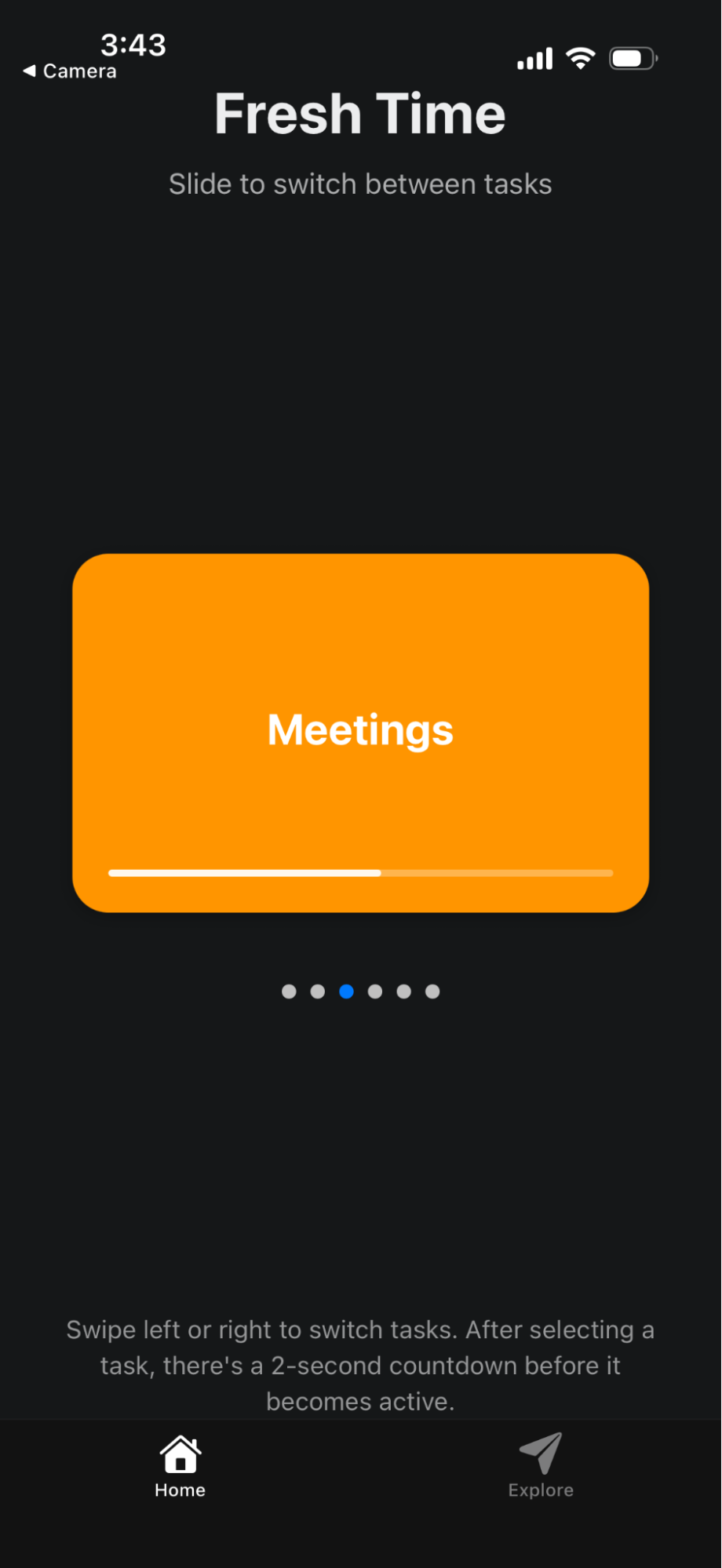
All the user needs to do is swipe to a project to start it. Now of course, you wouldn’t want to be accidentally starting every single project as you go past it. That’s why I introduced two strategic delays:
- The loading delay
- The swipe delay
The loading delay is a little loading bar that shows up on the project after you have swiped over it. After the bar has filled, the project has started. You have all the time prior to that to swipe away.
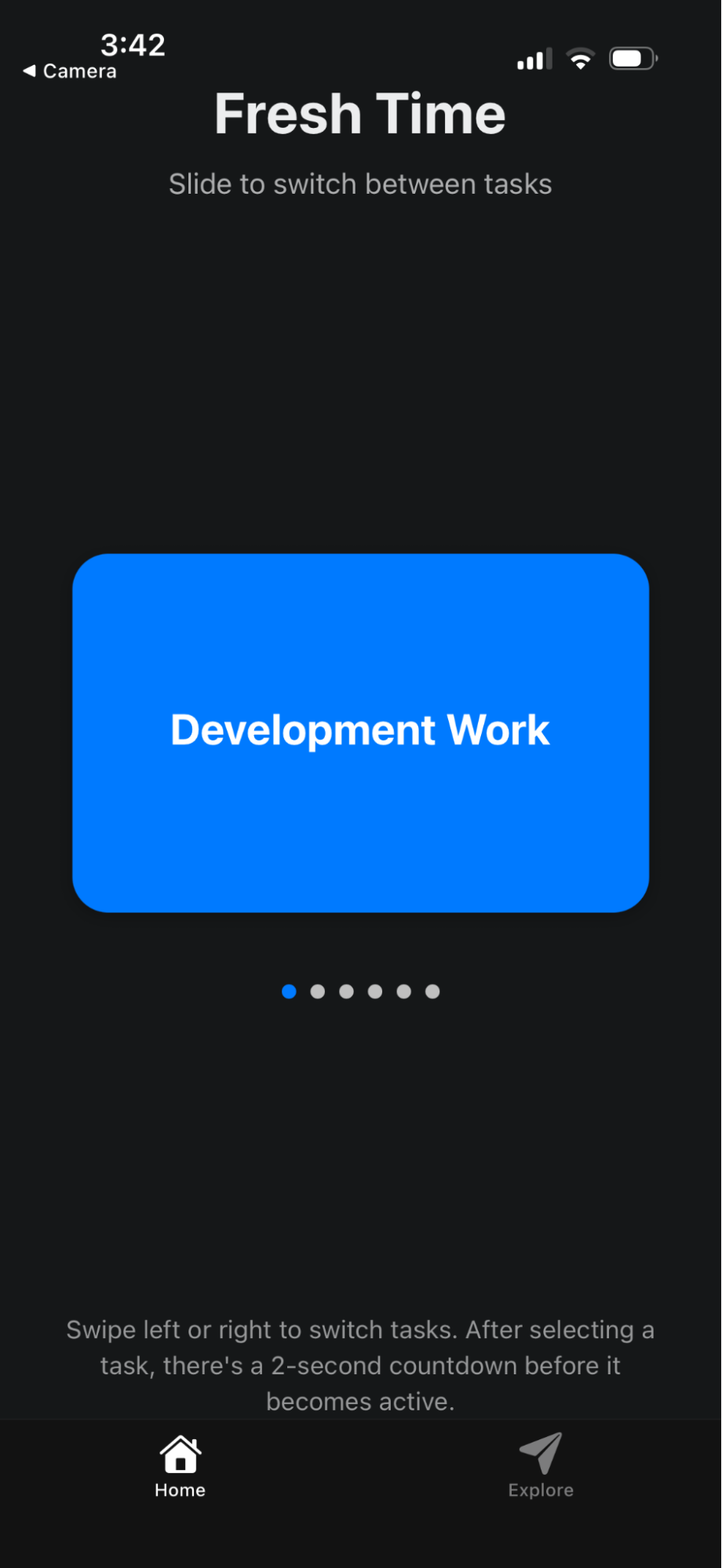
The swipe delay is actually a tiny delay prior to the loading delay. If you are swiping through the projects, trying to find the one you actually want, it is a stressful experience, because you feel like you can’t even read the name of the project before the countdown begins. The small delay prior to the countdown relaxes this significantly, by allowing the user a small amount of time to register what they just swiped to, and if it’s the project they want or not. Then they have the full countdown time to change their mind.
Conclusion
There is still a lot to do. I need to implement a timeline, make a “null” project so you aren’t immediately starting a project when you open the app, and I have much more ideas. But as of right now, I believe this is a very promising app that if nothing else, I will be able to use on a daily basis.
Disclaimer: This article was written at a later date than shown above using various notes from the original time.